This article will make you understand taxation and how it can be easily managed by Dynamics 365 Business Central (Navision). .
1- GST, PST and HST
Canada uses a different system of taxation called the GST – Goods and Services Tax, which is maintained at the Federal level. This tax applies 5% on most Canadian goods and services. This regulation was intended to streamline the Canadian tax system, but not all provinces complied. and some still require PST–Provincial Sales Tax (PST), QST- Quebec Sales tax. returns to be filed. In addition to this, there is HST–Harmonized Sales Tax which is used by provinces that did combine their provincial and federal level taxes.
Tax exemption exist for certain products on GST and PST as well as to the company level exemptions charities, non-profit, schools and government entities.
The Canada Revenue Agency (CRA) assigns a set of codes to track all the necessary information codes GIFI – General Index of Financial Information. are assigned at the level of the general ledger account and it could be used for financial reporting. It become handy when the tax period arrive and the company need to report it T2.
2- Dynamics 365 Business central
Using Dynamics 365 Business Central (Navision) will help you track all the tax rules. These are our best practices for using this software to collect and remit tax correctly.
- Associate GIFI Code at the GL account level (using the GL card)
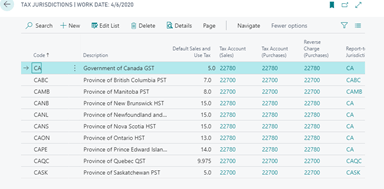
- Use Tax Jurisdiction and Tax area code to setup your GL tax code
- Use out of the box reporting first under the path below to report and details all transaction related before reporting
- Reports\Financial statement\Sales Tax Collected.
In Some scenario you may need more configuration or custom report Please don’t hesitate to Contact-us for assistance and benefit from one-hour free consultation with our specialists with deep accounting expertise in using Dynamics 365 Business Central (Navision) who can go quickly through the requirements for your company and establish clear and accurate processes to manage these complex business needs.
Below are proven best practices followed by Dynamics 365 Business Central consultants when implementing Canadian tax configurations.
 Use Tax Jurisdictions and Tax Area Codes
- Create Tax Jurisdictions for GST, PST, QST, and HST
- Group them into Tax Area Codes based on province or business scenario
- Assign Tax Areas to customers, vendors, and locations
This structure allows Business Central to automatically calculate applicable taxes.
Leverage Standard Business Central Reporting
Before creating custom reports, use out‑of‑the‑box reports, such as:
Reports → Financial Statements → Sales Tax Collected
These reports help:
- Validate tax calculations
- Reconcile tax balances
- Review transactions before filing returns
Review Tax Posting Setup Regularly
Changes in tax rates, exemptions, or business operations require periodic review to ensure compliance.